


InstaWeather: Your Weathershot
3.480.00 Reviews
App Specs
- Version
- 6.4.66
- Updated On
- License
- Free
- Downloads
- 100,000+
- Developer
- byss mobile
- Categories
- Weather
- Platform
- Android
Screenshots

 Analysis by AppCompare
I tend to trust a weather app most when I know what I’m using it for. InstaWeather: Your Weathershot is less about replacing every tool on your phone and more about pairing a local weather snapshot with a photo worth sharing. That distinction matters: I see it as a creative companion for everyday moments, not the one source I would rely on for every forecast decision.
A weather snapshot, not a forecast authority
Made by byss mobile, this free weather app has a 3.4 average from around 4.4K ratings, and it has been installed over 100K times. Those figures suggest that people do use it, but they are not a substitute for deciding whether its style suits your routine. I would try it for the photo overlays first, then judge whether its weather view gives me enough for the way I plan my day.
The distinction between a shareable snapshot and a planning forecast is useful in practice. A temperature and condition stamped onto a picture can explain why a beach looked inviting or why a walk turned into a rainy one. That can be a lovely record for friends, but a single image is not the same thing as a detailed forecast timeline. If I were timing a long drive or deciding whether a storm makes an outdoor event unsafe, I would check a dedicated forecast source as well.
What to check before sharing
The app’s core idea brings together a picture, weather information, and details such as time or location through its templates. Before posting, I would pause on the location element. A photo from a familiar public place may be harmless to share, while a real-time image from home or a regular route can reveal more than I intended. Choosing a less revealing image, or waiting until after leaving, is a simple way to keep the enjoyable part without broadcasting a precise moment.
I would also review the final image rather than assuming every template suits every photo. A large overlay can cover a face, a sign, or the part of the scene that made me take the picture. A more restrained design is usually better when the photo itself matters; a bolder one can work when the weather is the story. That small choice makes the result feel personal instead of like a forecast pasted over an image.
Location and personal choice
The original experience described here starts by accessing location to show local weather. That is convenient when I want a quick local snapshot, but location is also the point where I would make a deliberate choice. I would use the app when I am comfortable with location-based weather and check the device’s app-permission controls if I want to change how location access is handled. I would not assume that a location printed on a shared picture is private simply because it came from a weather feature.
Social sharing is presented as a quick route from the edited image to services such as Instagram, Facebook, or Twitter. I would treat that as a handoff I control: check the image, decide where it belongs, and share only when I am happy with the audience. If I prefer not to post publicly, I can still use a weather-stamped photo as a personal keepsake rather than turning every snapshot into a social update.
Worth Reading Before You Choose

EA SPORTS FC Mobile 26 Is a Bigger Football Game, but It Takes Time

Flipboard Shows What News Apps Must Do Beyond the Feed

Switching to Android Auto Means Rethinking Your Driving Routine

Google Calendar Makes a Crowded Week Easier to Manage

Ludo King Makes the Most of the Minutes Between Plans

Baby Panda World Brings Quick Play to Modern Phones, but Its Game Library Feels Busy
Capturing the Weather, Instagram Style
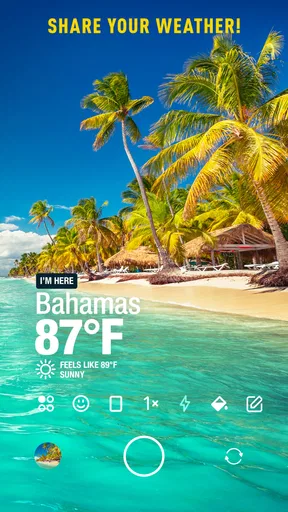
When you first open InstaWeather, you'll notice it's pretty straightforward. The app immediately accesses your location, and boom, there's your weather info paired with your local forecast. It’s like your daily weather app had a stylish makeover and became Instagram-ready. The interface is sleek and easy to navigate, which I really appreciated. No one likes getting lost in a sea of options.
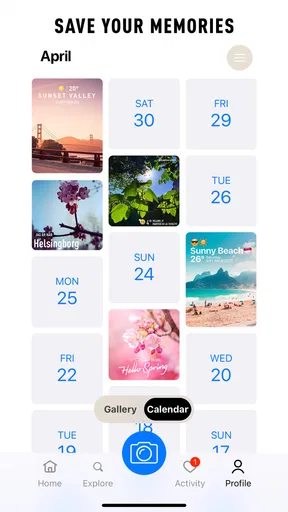
Now, what really makes this app stand out is how it lets you personalize your photos with weather overlays. Imagine snapping a picture of the beach and adding the current temperature and conditions right on top. It’s not just about sharing a photo; it's about sharing a moment, complete with the atmosphere around you. It's kind of like adding a mood ring to your photos.
Features That Shine
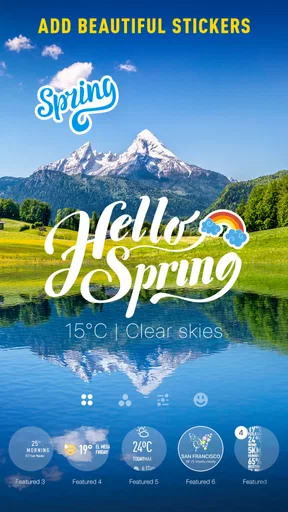
Let's talk features, because this app has a few that are worth mentioning. You can choose from a variety of templates, each designed to display not just the weather, but also the time and location. The templates range from minimalistic to vibrant, so there’s something to fit every aesthetic.
Another neat feature is the app's ability to integrate with your social media accounts. With just a few taps, you can share your weather-embellished photos directly to Instagram, Facebook, or Twitter. It’s seamless and perfect for those of us who love social sharing without the hassle.
Plus, if you’re someone who likes to keep track of the weather in multiple locations, you’ll love the multi-city support. You can easily switch between different places and see what the weather’s like elsewhere. It’s like having a travel guide that fits in your pocket.
Everyday uses that make the format click
A realistic example is a weekend picnic. I can check the local conditions, take a photo when the light is good, and add a template that gives the image context. If the weather changes later, the picture still captures what the afternoon actually felt like at that moment. That makes the overlay more useful as a memory than as a promise about what the rest of the day will bring.
Multi-city support has a different kind of everyday value. If a friend or family member lives elsewhere, switching between places can help me compare the broad conditions before deciding what to pack or when to call. I would still use a fuller forecast for details such as the timing of rain, but this quick comparison can answer the simple question, “Is it much colder there than here?” without turning a casual check into a planning session.
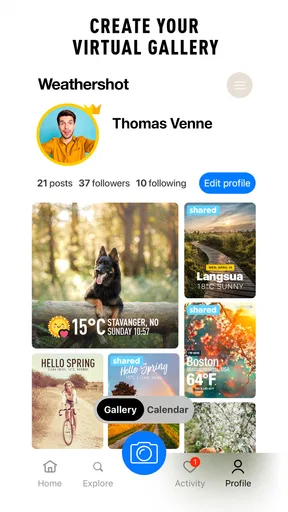
The app is best suited to people who already take photos and enjoy adding context before sharing them. It may also appeal to someone who wants a lightweight weather diary: a series of images can help recall the feel of a trip or season. If I mainly want radar, severe-weather alerts, detailed hourly planning, or a no-frills glance at the temperature, I would choose a dedicated weather app for that job and treat this one as optional.
User Experience and Design
The user experience is pretty smooth. Everything’s designed to be intuitive, so you won’t find yourself fumbling around. The design is modern and clean, which really lets your photos take center stage. I found that the app runs smoothly without any noticeable lag, which is always a plus.
However, it does come with ads, which can be a bit distracting. But if you’re really into it, there’s an option to remove them for a small fee. It’s something to consider if you’re planning to use the app frequently.
What the free experience asks of you
The app is free to download, but it also offers in-app purchases priced from $1.99 to $28.99 per item. I would start with the free experience and only consider paying if I use the photo workflow often enough to know what is getting in my way. Since the app includes ads, the practical trade-off is straightforward: occasional users may find them tolerable, while frequent editors may be more sensitive to interruptions. I would not spend money just to test whether the basic idea appeals to me.
InstaWeather is rated for Everyone and was released on March 14, 2018. Its current version is 6.4.66, and it requires Android 7.0 or later. Those details make it easier to judge compatibility, but the more important question is whether the app fits your habits. If you rarely share photos, its central feature may not earn a regular place on your home screen.
Compared with the usual weather alternatives, this app puts the shareable image first. A standard weather app is generally the more practical choice when I want to scan several forecast details quickly; a social camera app may offer more editing tools when the visual treatment matters most. InstaWeather sits between those habits, giving a weather-focused overlay workflow rather than asking me to build the same image manually. The trade-off is that it is not the strongest reason to switch away from a trusted forecasting app.
Why You Might Love It
If you’re someone who loves photography, enjoys sharing on social media, or just wants to keep a unique weather diary, InstaWeather: Your Weathershot is definitely worth a download. It’s a fun way to add a little something extra to your photos and connect with friends through shared experiences. Plus, it’s free, so there’s really no harm in giving it a shot.
Overall, I’d say this app is a keeper for anyone looking to add some personality to their weather updates. It’s not just about knowing if you need an umbrella, it’s about capturing the moment and sharing it in style. So, if you’re ready to take your weather updates to the next level, InstaWeather might just be your new favorite app.
My cautious verdict
I would recommend giving it a try if weather is part of the story you want your photos to tell. Its strongest use is a quick, personal weather-stamped image, especially when a place’s conditions help explain the memory. I would keep a conventional forecast app for decisions that depend on precise planning, and I would think twice before sharing an image that exposes a location I want to keep private.
That balance is what makes the app easy to place: it can add a distinctive detail to a photo without needing to become the center of my weather routine. Start with a low-stakes picture, choose a template that leaves the image readable, and decide whether the sharing flow feels worth repeating. If that small creative step brightens your weather updates, it has a clear purpose; if you only need dependable forecasting, another weather app will likely serve you better.
Pros
- Customizable weather overlays.
- Real-time weather updates.
- Easy social media sharing.
- Wide range of templates.
- Accurate location tagging.
Cons
- Occasional GPS inaccuracies.
- Limited free features.
- Ads can be intrusive.
- Some templates are paid.
- Requires stable internet.
FAQs for InstaWeather: Your Weathershot
What features does InstaWeather: Your Weathershot offer?
InstaWeather: Your Weathershot offers a variety of features that enhance your weather tracking experience. It provides real-time weather updates, forecasts, and customizable weather overlays for photos. Users can also access detailed information such as temperature, humidity, and wind speed. The app allows for easy sharing of weather-tagged images on social media.
Is InstaWeather: Your Weathershot free to use?
InstaWeather: Your Weathershot is available as a free download on both Android and iOS platforms. While the free version includes basic features, there are in-app purchases available for users who want to unlock premium features, such as additional themes and advanced customization options.
How accurate is the weather information provided by InstaWeather?
The app sources its data from reliable weather services to ensure accuracy. However, like any weather app, there can be occasional discrepancies due to rapidly changing conditions or data retrieval issues. Users generally find it reliable for daily use, but it's always wise to verify severe weather alerts from multiple sources.
Can I customize the weather overlays on my photos?
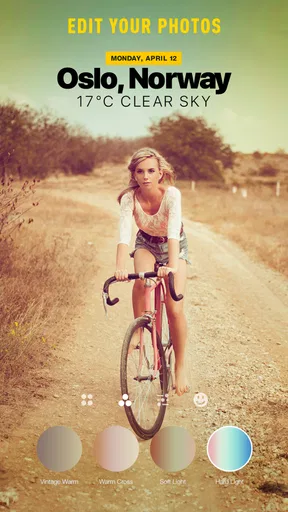
Yes, InstaWeather: Your Weathershot offers a range of customization options for weather overlays on your photos. Users can select from different styles, colors, and themes to match their personal preference or the aesthetic of the photo. This feature makes sharing weather updates visually engaging and personalized.
Does InstaWeather require an internet connection to work?
InstaWeather: Your Weathershot requires an internet connection to fetch real-time weather updates and forecasts. While some features, like previously downloaded themes or saved photos, can be accessed offline, the most current weather data and certain app functionalities will need an active connection.


